For the customer
Scope Letter
Included work, notes, exclusions, and lump-sum pricing. Generate the document, review its contents and draft status, then print or save it as a PDF.
Estimating & handoff
DeepTakeoff prices the included takeoff using your configured materials, labor, and hardware. Review costs by location, apply markup, and generate the customer documents and shop handoff from the same project.
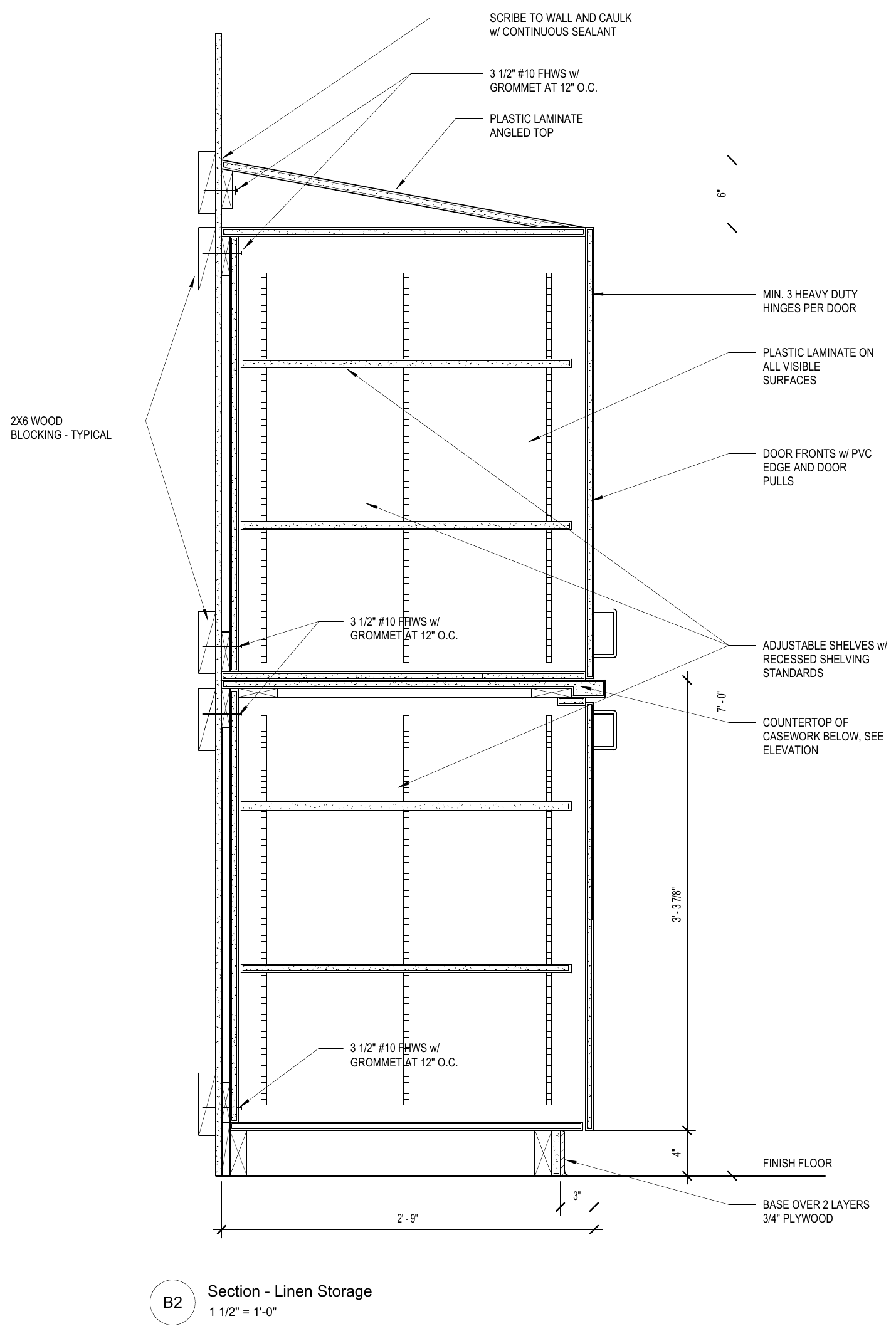 Read the full-size Section ↗
From construction to cost
DeepTakeoff derives the parts and operations from its construction analysis, including shelves, front types, supports, edges, and finished surfaces.
DeepTakeoff applies your shop’s configured material, labor, hardware, and pricing rules to that takeoff. The estimate keeps the quantities and costs visible under the locations that own the work.
Cabinet geometry, shelves, fronts, supports, edges, and finishes.
Resolved material codes, hardware choices, labor, and pricing rules.
The work in each included Room and delivery phase.
The estimate’s cost, with markup applied when generating the quote.
A missing material mapping or price is an unresolved input. Review it at the source before relying on the amount in the quote.
A price you can work through
The example run has four base cabinets, four wall cabinets, and a countertop in each Room. Include the second Room or change the markup, then inspect the quantities, cost breakdown, and customer Scope Letter.
Try the example estimate
Room 01
| Included work | Qty | Unit price | Amount |
|---|---|---|---|
| Base casework4 × 24-inch cabinets per Room | 4 | $1,200 | $4,800 |
| Wall casework4 wall cabinets per Room | 4 | $800 | $3,200 |
| CountertopOne top per Room · surface, substrate, and edge work | 1 | $1,200 | $1,200 |
Change the Rooms or markup to see the quantities, costs, and Scope Letter update together. This calculator uses a separate synthetic project and costs; no tax, delivery, or installation allowance is modeled. Your actual estimate uses your shop’s configured pricing.
The example starts with aggregated unit costs. The product derives the included parts from construction and applies your configured pricing.
Explore the source drawing evidence ↗Supply scope
DeepTakeoff separates your supplied components from surrounding work by other trades and carries that scope into pricing and output.
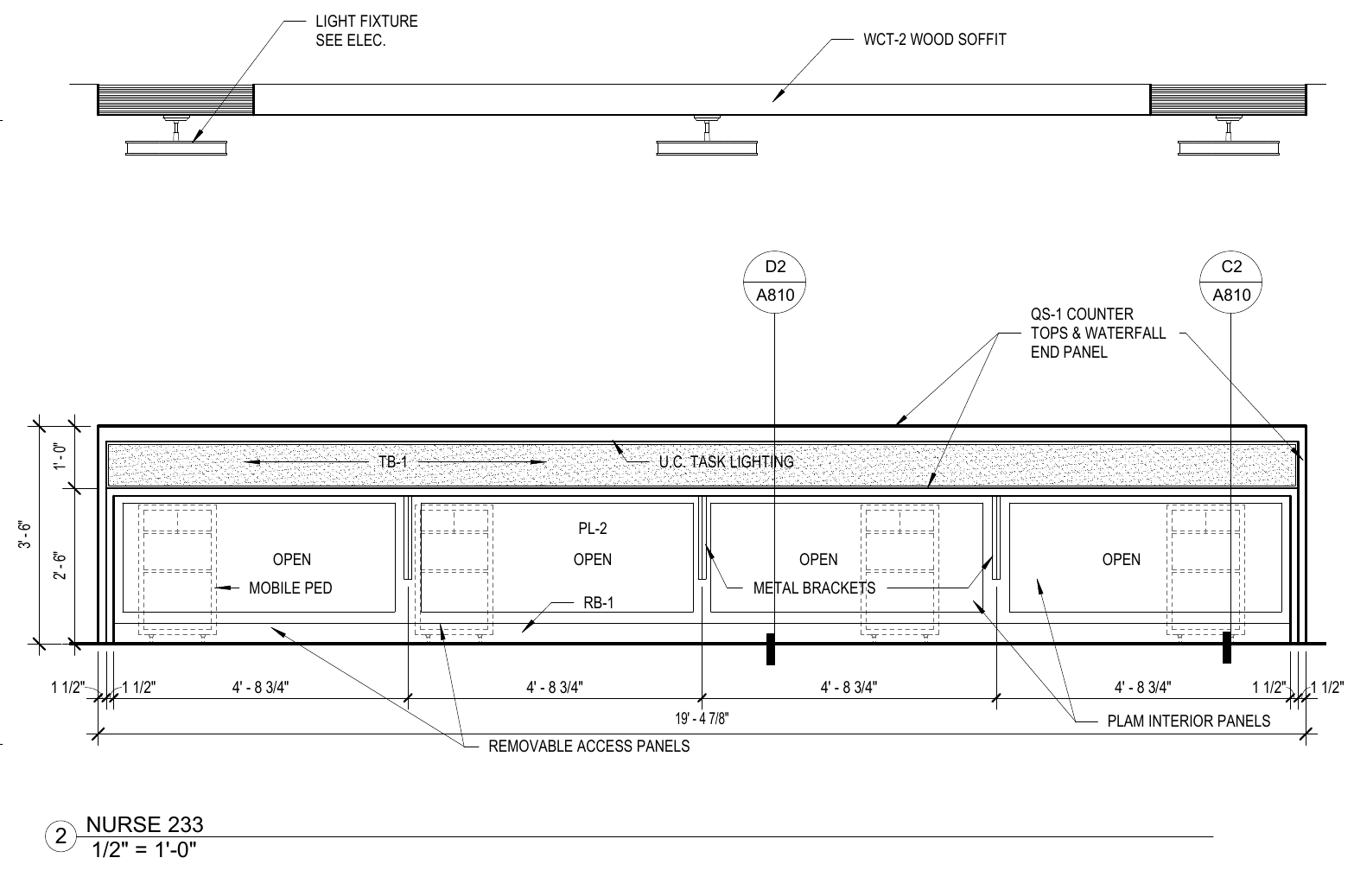 Read the source notes ↗
| On the drawing | The shop’s contribution | Supplied by others |
|---|---|---|
| Under-cabinet lighting | The valance that conceals the fixture | The light fixture and electrical work |
| Countertop over a knee wall | The countertop | The stud and gypsum support wall |
| Wire shelving beside a laminate shelf | The laminate shelf | The wire shelving |
Review the project’s actual scope and exclusions. Marking an Elevation OUT excludes it from the bid; it does not resolve a problem with included work.
Before issuing the bid
Quote Review and the Detailed Quote expose ownership, material, labor, per-unit, and extended amounts. Quote generation applies your selected markup to cost.
Bid Readiness brings the unresolved findings together. Check source coverage, correct conflicting material answers, and review warnings before approving the project.
Documents & exports
The customer, the shop, and the business system need different views of the same reviewed scope.
For the customer
Included work, notes, exclusions, and lump-sum pricing. Generate the document, review its contents and draft status, then print or save it as a PDF.
For estimate review
Tables by owned location show material, labor, unit prices, and extended amounts for runs and countertops. Review the quantities, pricing, and exceptions before sharing.
For CabinetVision
Preview catalog matches, matched cabinet counts, issues, and skipped rows before downloading the file. Export uses your organization’s catalog configuration; check the imported job in CabinetVision.
For your business system
Select the customer and preview the quotation in your configured connection. Review items and warnings before syncing. Readiness and approval checks apply to the project state being sent.
Configured to your shop
A useful estimate depends on the shop’s materials, rates, and supply decisions. Those are inputs to DeepTakeoff, with source evidence and review around how they are applied.
Configure the catalog items and pricing that drawing codes and construction requirements should resolve to.
Use the shop’s labor and pricing rules. Review cost separately from the markup applied to the quote.
Set up CabinetVision catalog matching and the ERPNext connection before using their export workflows.
The demo shows how this configuration is applied to a project, from material mapping through location costs and the generated quote.
Product demo
See the takeoff, pricing configuration, quote review, and export workflows in use.